
The confusion about how to message “Found you via Linkedin profile” is very common among LinkedIn users. It’s not clear what the wording means, and as a result some people just leave it off entirely because of the lack of direction from Linkedin itself on this subject matter.
Contents
- 1 “Found you via LinkedIn profile”
- 2 Where does that message show?
- 3 What is a good next step for you when someone found you via their Linkedin profile?
- 4 Other messages you can see when users visited your Linkedin profile:
- 5 Frequently Asked Questions
- 5.1 What does ‘Found you via LinkedIn profile’ mean?
- 5.2 Where can I see who found me via my LinkedIn profile?
- 5.3 What are the different ways someone can find my LinkedIn profile?
- 5.4 How does the ‘People Also Viewed’ section work on LinkedIn?
- 5.5 Should I message someone who found me via my LinkedIn profile?
- 5.6 What’s the difference between ‘Found you via LinkedIn profile’ and ‘Found you via LinkedIn search’?
- 5.7 Can I appear in ‘People Also Viewed’ sections of other profiles?
- 5.8 What does ‘Found you via Google search’ mean on LinkedIn?
- 5.9 How can I increase profile views from the ‘People Also Viewed’ section?
- 5.10 What should I do if I receive a profile view notification from an unknown visitor?
“Found you via LinkedIn profile”
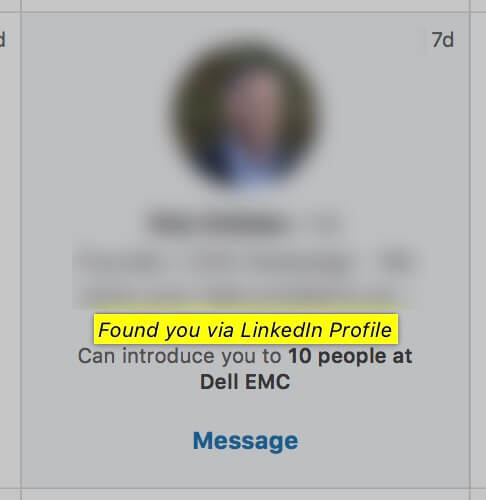
This user saw that others who searched for their own profiles also looked at X, Y, or Z (the right sidebar of our profile). If you see this in your “Who viewed your profile settings, it means that the person has found you after seeing one of your suggestions on someone else’s profile or by being connected with an existing friend who clicked through from them already.
Where does that message show?
When you scroll down your dashboard section on your profile and click “Who viewed my profile?” You’ll be able to see who’s watching while also learning how they found out about that person!
Where can you be seen on other users’ profiles?
There are a number of places you may appear on someone else’s profile page. This includes:
- People Also Viewed
- Articles & Activity
- Skills & Endorsements
The majority of your profile views will come from the “Viewers who also viewed this page” section. This is a widget on the right-hand side (desktop) or bottom section for mobile users to see how many times their favorite pages have been seen by others!
What is a good next step for you when someone found you via their Linkedin profile?
When you receive a notification that someone found your profile on Linkedin, the best course of action is to take whatever they say with a grain (or two) of salt. If the visitor is a first-degree connection then use this as an excuse for conversation starters; if not? Go ahead and send them one or two messages thanking them specifically for how awesome his/her research was before moving forward!

Other messages you can see when users visited your Linkedin profile:
“Found you via the homepage”: that means your profile was shown in their profile as a result of maybe you liked their content.
“Found you via LinkedIn search”: You must be really popular on LinkedIn because someone searched for your name or an attribute in your Linkedin profile you are ranking for and looked up your profile!
“Found you via My Network”: the user was already in your network and search for you.
“Found you via Messaging”: you have sent the user who viewed your profile a message before.
“Found via LinkedIn Company Pages”: this means someone found you via a LinkedIn Page liked by you, commented by you or you listed as your workplace.
“Found you via Google search”: you can’t underestimate the power of LinkedIn. When a user searches on Google and you pop up, their passage through your profile is an indication that they found what they have been searching for! The more time someone spends engaging with our content, the higher chance there will be for them to search us up later when we share information about other companies who might be able to help out too.
See also what Linkedin writes about the search on their site.
Frequently Asked Questions
What does ‘Found you via LinkedIn profile’ mean?
This notification indicates someone discovered your profile through LinkedIn’s recommendation system—likely from the ‘People Also Viewed’ section on another user’s profile or through a mutual connection’s suggestion. It shows organic profile discovery rather than direct search.
Where can I see who found me via my LinkedIn profile?
Visit your LinkedIn dashboard, click ‘Who viewed your profile,’ and scroll through the list. Each viewer shows how they discovered you—including ‘Found you via LinkedIn profile’ with details about which profile or suggestion led them to you.
What are the different ways someone can find my LinkedIn profile?
LinkedIn tracks multiple discovery paths: direct search, homepage recommendations, your network, previous messages, company pages, Google search results, and the ‘People Also Viewed’ widget. Each generates a different notification type to help you understand traffic sources.
How does the ‘People Also Viewed’ section work on LinkedIn?
When users view a profile, LinkedIn displays related profiles in the right sidebar (desktop) or bottom section (mobile). Your profile may appear here based on shared skills, industry, connections, or activity relevance—driving passive discovery without direct interaction.
Should I message someone who found me via my LinkedIn profile?
Yes, personalized follow-up is effective. For first-degree connections, use it as a conversation starter. For new visitors, send a brief thank-you message acknowledging their research and interest, then propose a meaningful next step aligned with mutual interests.
What’s the difference between ‘Found you via LinkedIn profile’ and ‘Found you via LinkedIn search’?
‘Via LinkedIn profile’ means they discovered you through recommendations or the ‘People Also Viewed’ widget on someone else’s page. ‘Via LinkedIn search’ means they actively searched for you by name or keywords, suggesting higher intent and familiarity.
Can I appear in ‘People Also Viewed’ sections of other profiles?
Yes. LinkedIn’s algorithm places your profile in these sections based on profile relevance, shared connections, mutual interests, industry alignment, and engagement patterns. Optimizing your profile and staying active increases visibility in these recommendation widgets.
What does ‘Found you via Google search’ mean on LinkedIn?
This indicates someone searched for you on Google, found your LinkedIn profile in search results, and clicked through to view it. It reflects your Google SEO visibility and demonstrates external discovery beyond LinkedIn’s native platform.
How can I increase profile views from the ‘People Also Viewed’ section?
Strengthen your profile completeness, add relevant skills and endorsements, engage with industry content, maintain consistent activity, and build quality connections. These signals help LinkedIn’s algorithm recommend your profile to relevant audiences viewing similar professionals.
What should I do if I receive a profile view notification from an unknown visitor?
Research their profile to understand mutual interests or connections, then decide if engagement aligns with your goals. Send a thoughtful, personalized message explaining why connecting would be mutually beneficial—avoid generic outreach templates.


